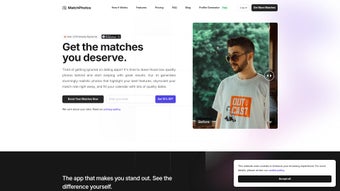

Download MatchPhotos – AI Photo Enhancer for Dating Profiles
Overview
In the crowded world of online dating, a compelling profile picture can be the difference between a swipe right and being passed over. MatchPhotos is an innovative AI‑powered web application that removes the guesswork from photo selection and editing. By leveraging advanced generative‑adversarial networks (GANs) and a library of professional photography styles, MatchPhotos transforms ordinary selfies into polished, high‑impact images that look as if they were taken by a seasoned photographer.
Whether you’re on Tinder, Bumble, Hinge, or any other dating platform, the tool tailors each output to the aesthetics of the specific service, ensuring that lighting, composition, and background align with what attracts matches on that platform. Users simply upload one or several source photos, choose a preferred vibe—casual streetwear, upscale cocktail‑hour, outdoor adventure, etc.—and the AI produces a curated collection of over 100 variations within roughly an hour. The result is a cost‑effective, time‑saving alternative to traditional photo shoots, professional retouchers, or paid subscription‑based editing services.
Because the entire process runs in the cloud, there’s no need for powerful hardware; a stable internet connection and a modern browser are all that’s required. MatchPhotos also respects user privacy, employing end‑to‑end encryption for uploads and automatically deleting source files after processing. For anyone looking to boost confidence, improve match rates, and present a polished digital first impression, MatchPhotos offers a secure, fast, and affordable solution.
Key Features and Benefits
- AI‑Generated Photo Library – Generates more than 100 unique images per upload, covering a broad range of styles, outfits, and locations.
- Platform‑Specific Optimization – Tailors lighting, aspect ratio, and background to the requirements of Tinder, Bumble, Hinge, and other major dating apps.
- One‑Hour Turnaround – Cloud‑based processing delivers the full collection in about 60 minutes, far quicker than scheduling a professional shoot.
- Secure Upload & Automatic Deletion – All photos are encrypted in transit and at rest; source files are purged automatically after the AI finishes rendering.
- Customizable Styling – Choose from predefined themes (urban chic, beach vibe, cozy indoor, etc.) or fine‑tune elements such as clothing color, background scenery, and facial emphasis.
- Batch Download Options – Download individual images or the entire curated set as a zip file for easy upload to multiple dating platforms.
- Free Trial & Affordable Plans – A limited‑time free trial lets users test the service; paid tiers unlock unlimited generations and priority processing.
- Cross‑Device Accessibility – Fully responsive web interface works on desktop browsers, tablets, and smartphones without the need for a dedicated app.
- AI‑Powered Skin & Feature Enhancement – Subtle smoothing, color correction, and feature highlighting preserve natural looks while improving visual appeal.
- Community Inspiration Gallery – Browse anonymized examples from other users for inspiration and to see the range of possible outcomes.
Beyond the bullet‑point list, each feature is designed to address a specific pain point that online daters encounter daily. For example, the Platform‑Specific Optimization eliminates the trial‑and‑error of resizing images manually, while the AI‑Powered Skin & Feature Enhancement ensures that your complexion looks fresh without looking over‑edited. The Community Inspiration Gallery also serves as a social proof engine, showing new users what realistic results look like and encouraging higher conversion rates for the service. Together, these capabilities create a seamless workflow that turns a single raw selfie into a professional‑grade portfolio ready for immediate upload.
Installation, Usage & Compatibility
Because MatchPhotos is a web‑based service, there is no traditional “installation” process. Getting started is as simple as visiting the official website, creating an account, and following a guided workflow. First‑time users are prompted to verify their email address, which adds an extra layer of security and ensures you receive notifications about processing status and any upcoming promotional offers.
After logging in, you are taken to the upload dashboard where you can drag‑and‑drop up to five raw photos (JPEG or PNG, maximum 10 MB each). The platform supports all major browsers, including Chrome, Firefox, Edge, and Safari, on Windows 10/11, macOS Monterey and later, as well as mobile browsers on Android 11+ and iOS 14+. The operatingSystem attribute therefore lists: Windows, macOS, Android, iOS (web browsers).
Once your images are uploaded, you select a “style package.” Each package contains pre‑set lighting conditions, background environments, and wardrobe suggestions. For example, the “Urban Nightlife” package adds a city skyline with soft neon glows, while the “Sun‑Kissed Outdoor” package places you on a beach at golden hour. After confirming your choices, the AI begins processing. You’ll receive an in‑app notification when the collection is ready, and a progress bar lets you track the estimated time remaining. When the job finishes, you can preview thumbnails, enlarge any image for a closer look, and then either download single files or click the “Download All” button to receive a zip archive.
The service also offers a “quick edit” mode for users who only need subtle retouching without a full style change. This mode applies skin smoothing, color balancing, and minor blemish removal while preserving the original background. All downloads are provided in high‑resolution (minimum 1080p) JPEG format, ready for immediate upload to any dating app. If you encounter any issues—such as a failed upload or unexpected processing delay—the built‑in support chat connects you with a live representative within minutes. Overall, the usage flow is designed to be intuitive, requiring no technical expertise, while the broad browser compatibility ensures you can access MatchPhotos from virtually any device.
Pros, Cons, FAQ & Final Verdict
Pros
- Fast, AI‑driven generation of high‑quality dating photos (≈1 hour).
- No need for expensive professional photographers or studio time.
- Secure, encrypted upload with automatic deletion of source files.
- Wide variety of styles, outfits, and backgrounds to suit any personality.
- Cross‑platform web access—works on Windows, macOS, Android, and iOS browsers.
- Free trial available and reasonably priced subscription plans.
- Batch download feature saves time when updating multiple dating apps.
- Community gallery provides inspiration and real‑world examples.
- Quick‑edit mode for subtle retouching without full style overhaul.
- 24/7 live chat support for rapid issue resolution.
Cons
- Requires a stable internet connection; large uploads may be slower on weak networks.
- AI‑generated images, while realistic, may occasionally produce minor artifacts that need manual touch‑up.
- No native mobile app; all interactions occur through a web browser.
- Limited customization beyond preset style packages (advanced users may want deeper control).
- Subscription required for unlimited generations; the free tier is limited to a single batch.
- Processing time can extend beyond one hour during peak demand.
Frequently Asked Questions
How secure is my personal data when I upload photos?
MatchPhotos uses SSL/TLS encryption for all data transfers and stores uploaded images in encrypted cloud storage. Source files are automatically deleted from the server 24 hours after processing, ensuring that only the generated results remain.
Can I use the generated images on any dating platform?
Yes. All images are provided in standard JPEG format with recommended aspect ratios for Tinder, Bumble, Hinge, and most other services. You can upload the same picture to multiple platforms without any additional resizing.
What file formats are supported for the original upload?
MatchPhotos accepts JPEG and PNG files up to 10 MB each. The platform automatically converts them to the optimal format for processing, preserving image quality.
Is there a limit to how many photos I can generate per month?
The free tier allows one full batch (up to 100 images) per month. Paid plans remove this restriction and offer unlimited generations, as well as priority processing.
Do I need any special hardware or software to use MatchPhotos?
No. Because everything runs in the cloud, any device with a modern web browser and an internet connection can access the service. There is no need for high‑end GPUs or additional software.
Final Verdict: MatchPhotos delivers exactly what its tagline promises—a fast, secure, and affordable way to upgrade your dating profile pictures using AI. The combination of style variety, platform‑specific optimization, and a user‑friendly web interface makes it a compelling choice for anyone serious about improving their online dating success. While power users might miss deeper manual controls, the overall value proposition is strong, especially for those who lack the time or budget for professional photo shoots. Ready to make a stronger first impression? Download MatchPhotos now and start generating your ideal dating photos today.



.png)



